
High-fidelity flat map.
Real-time aircraft positions, route lines, flight trails, zoom-aware labels, and selected-flight focus.

Real-time radar, 3D globe, AI travel intelligence
A powerful flight tracking experience built around the live map: aircraft traffic, airport boards, route replay, weather overlays, secure SSO, and travel-day guidance in one polished aviation command center.
Core Experience
Watch thousands of flights move in real time across a high-fidelity 2D radar map or an immersive 3D globe. Every aircraft is designed to carry live altitude, speed, heading, and flight number context, so one tap can open the route, aircraft type, departure gate, and arrival status.
The 3D globe mode turns flight tracking into a global aviation view. Rotate, zoom, and tilt the Earth to reveal dense traffic corridors, oceanic routes, airport clusters, and long-haul movement patterns at a glance. It works for practical tracking and for the pure fascination of seeing the sky in motion.
Real-time aircraft positions, route lines, flight trails, zoom-aware labels, and selected-flight focus.
Rotating globe view for global density, major corridors, transoceanic routes, and long-haul context.
Replay a flight's historical path with speed, altitude, route progress, and timeline context.
Product screenshots
AeroRadar opens directly into live aviation context. The screenshots below show the current product direction: aircraft traffic, route-focused flight details, weather surfaces, layer configuration, and aircraft-type visualization.


Screenshot copy deck
Use these blocks directly on the website, in app-store collateral, investor decks, or social launch posts. Each feature is paired with a current Android app screenshot so the page shows real product progress, not abstract promises.
AeroRadar starts with the map because that is where flight tracking belongs. Users can pan, zoom, focus current GPS position, inspect traffic, and select aircraft without navigating through a dashboard first.
A compact flight card keeps the map visible, while the expanded view adds terminal, gate, baggage, status, aircraft type, previous leg, route information, and provider freshness.
Users can choose the app start screen, map scale visibility, units, map style, traffic layers, aircraft labels, route paths, legends, and accessibility-oriented display settings.
Weather radar, clouds, storm cells, temperature, and wind settings are designed as aviation overlays so users can understand how conditions may affect routes, arrivals, and delays.
The weather view supports temperature visualization, wind surface controls, source selection, and map legends so conditions are understandable without cluttering the live aircraft layer.
AeroRadar distinguishes commercial jets, regional jets, cargo aircraft, private jets, turboprops, helicopters, military aircraft, and small aircraft with configurable legend sizing.

Text, voice, camera scan, handwriting, route/date, and map context all feed one search experience designed to reach the right flight faster.
Selected flights can show completed route segments, remaining destination path, replay controls, telemetry history, altitude and speed trends, and route-aware camera behavior.
Google and Microsoft sign-in, Firebase profile sync, phone-based SMS MFA, saved searches, tracked flights, alerts, settings, and diagnostics are designed as part of one secure user profile.
Airport panels are designed for inbound and outbound boards with planned versus actual times, status, gate, terminal, baggage claim, delays, filters, and clear loading states.
AeroRadar includes an Airspace and Hazards layer group for AIRMET, SIGMET, and TFR polygons with source, valid time, altitude band, and refresh metadata.
The assistant is designed to explain delay risk, connection risk, leave-now timing, gate changes, airport navigation, and what a traveler should do next without inventing unavailable data.
Feature set
The app is built for both quick traveler answers and deeper aviation exploration. Users can track a single flight, inspect airport operations, scan a boarding pass, replay a route, or switch into a global 3D view without leaving the product.
Map-first launch, zoom-aware labels, aircraft category icons, airline color accents, completed and remaining route paths, and selected-flight focus.
Flight number, airline, aircraft type, tail number, altitude, speed, heading, route progress, gate, terminal, baggage, previous leg, next leg, and flight log access.
Arrivals and departures, planned versus actual time, gate, terminal, baggage claim, status, delay tags, filters, sorting, and airport-focused views.
Leave-now guidance, delay risk, connection risk, gate-change alerts, airport navigation actions, timeline cards, and concise traveler recommendations.
Maps, styles, and overlays
AeroRadar supports a customizable start screen and map experience. Users can start in Live Radar, World Map, or 3D Globe, then tune the visual stack to match how much context they want.
AeroRadar Live puts a versatile flight search engine at the center of the product. No matter what information a traveler has on hand, Smart Search is designed to turn typed, spoken, scanned, handwritten, route-based, or location-based input into the right flight context fast.
It goes beyond conventional flight-number lookup by accepting real-world travel fragments: a boarding pass, a printed itinerary, a route and date, an airport name, a natural voice command, or a quick handwritten note.
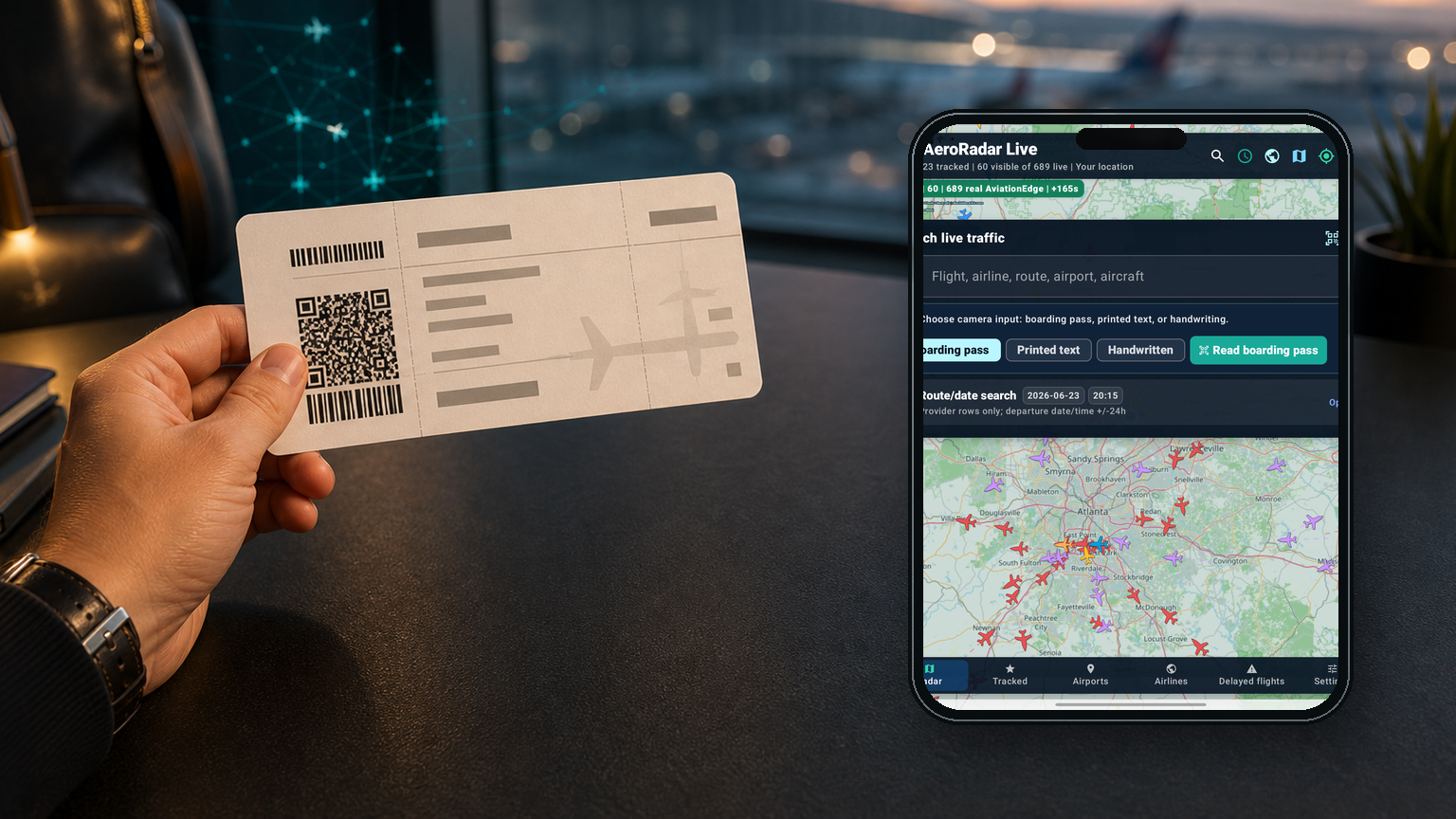
Scan a boarding pass barcode and send the recognized flight into AeroRadar search.
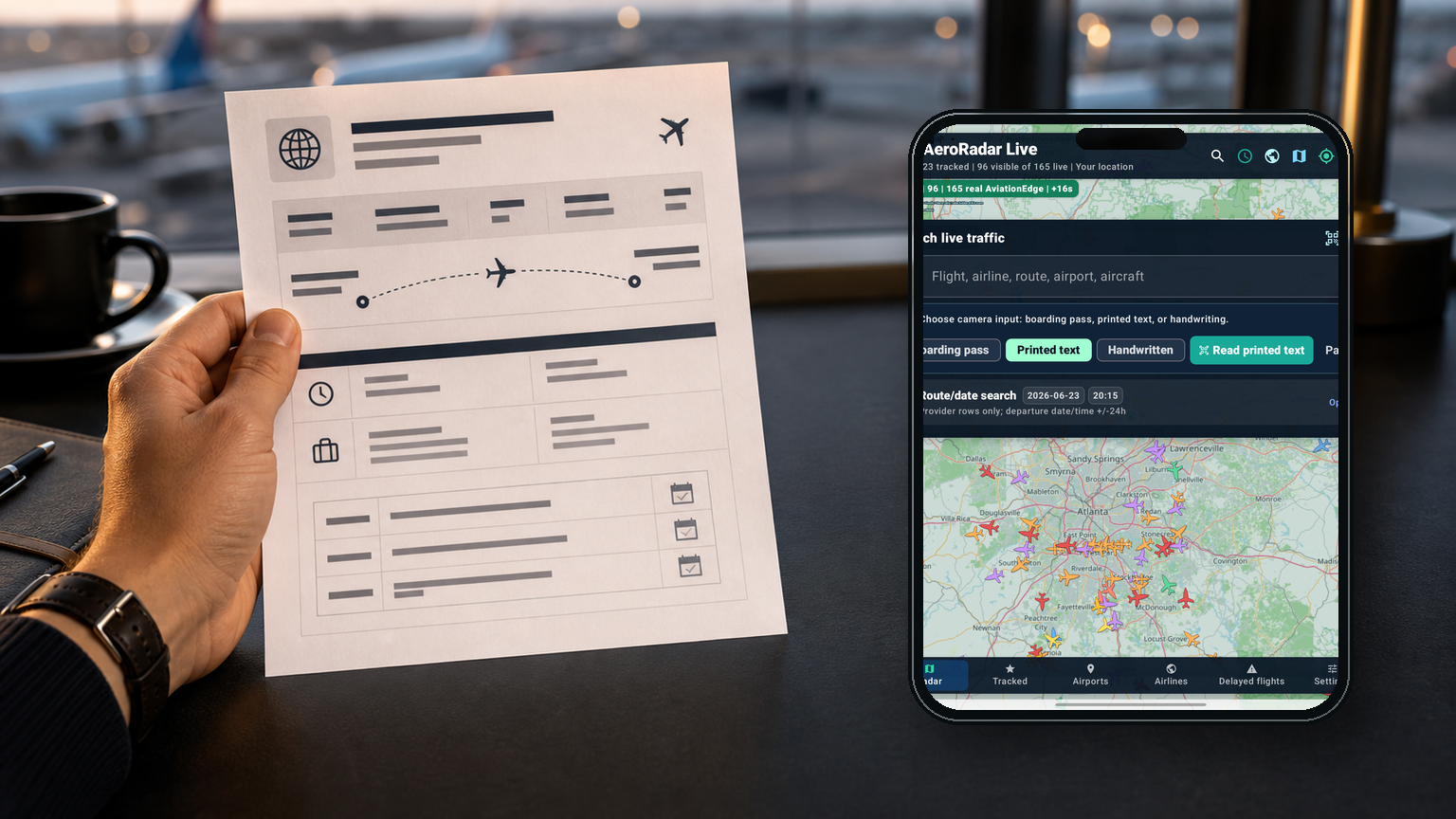
Use OCR on travel documents, emails, screenshots, or printed route details.

Capture a flight number or route from a quick note when typing is inconvenient.

Enter a flight number, airline, airport, route, city, or aircraft directly.

Speak a natural flight query and reuse the same search intelligence.
Six Ways to Search
AeroRadar accepts information however it arrives: typed, spoken, scanned, handwritten, location-aware, or built from an origin, destination, and travel date.
Type a flight number, route, airline, airport code, city, aircraft type, or tail number and move straight to the right flight, airport board, or live map context.
Global Language Mode
Smart Search becomes much more powerful when travelers can use the app in the language they naturally think in. AeroRadar Live supports localized navigation, search prompts, flight boards, settings, and result context across 74 languages.
This makes AeroRadar Live a stronger companion for international airports, families tracking flights across borders, and travelers who want flight intelligence without switching mental gears.
Data and operations
The app is designed to use real providers when available, clearly disclose fallback states, and avoid blocking the map while provider calls refresh in the background.
Traveler and aviation intelligence
AeroRadar does more than show where a plane is. It helps users understand what the flight status means, where the aircraft came from, what might happen next, and what the traveler should do now.
Website copy blocks
AeroRadar Live is a premium flight tracking app that combines live aircraft maps, airport boards, weather overlays, route replay, secure profile sync, and AI travel-day assistance in one elegant, map-first aviation experience.
AeroRadar Live gives travelers and aviation enthusiasts a powerful way to understand the sky around them. Search by flight number, airport, airline, route, voice, barcode, or camera scan; then view live aircraft, gates, terminals, baggage status, airport arrivals and departures, weather risks, route paths, altitude and speed logs, alerts, and tracked flights. With customizable map styles, a 3D globe, aircraft filters, airspace hazard layers, secure SSO, SMS MFA, and AI-powered travel guidance, AeroRadar Live turns raw aviation data into confident next actions.
Website implementation path
This page can launch as a polished marketing website now, then evolve into a companion web tracker using the same backend gateway and account system as the Android app.
Use this page with screenshots, feature copy, privacy pages, support links, and product positioning.
Expose safe, cached provider search through the backend gateway for flight, airline, and airport pages.
Add a browser live-map mode with aircraft, weather, airport boards, and shareable selected-flight links.
Use Firebase Auth to sync tracked flights, saved searches, alerts, preferences, and assistant history.
AeroRadar Live
Live map first. Details when needed. Weather and hazards in context. Search from text, voice, camera, or barcode. Built to grow into a full web and mobile aviation intelligence platform.